Credit Card International Transaction Declined? 8 Reasons and Fixes
You enter your credit card details on an international website. Everything looks correct. Yet the payment page shows “Transaction Declined.”
This can happen while booking a foreign hotel, buying software, paying for an overseas subscription or shopping from a global website.
A declined payment does not always mean your card is blocked. In many cases, international usage is disabled or the transaction limit is too low. The bank may also stop the payment for security reasons.
This guide explains why a credit card international transaction is declined and how Indian cardholders can fix it safely.
Disclaimer: This article is for general educational purposes only. Card controls, fees and approval rules vary by issuer. Check your bank’s official app, website and card terms before making a payment.
Table of Contents
Quick Answer
If your credit card international transaction is declined, check these settings first:
- International usage is enabled.
- Online or e-commerce transactions are enabled.
- The international transaction limit is high enough.
- Sufficient credit is available after currency conversion.
- Card details and billing information are correct.
- OTP or other authentication was completed.
If everything is correct, contact the card issuer. Ask whether its security system, the merchant category or a country-level restriction blocked the payment.
Why International Credit Card Payments Fail
An international transaction involves more checks than a normal domestic purchase.
The payment may pass through:
- The merchant
- The payment gateway
- The card network
- The merchant’s acquiring bank
- Your card issuer
- An authentication service
A rejection at any stage can stop the payment. The message displayed by the merchant may not explain the exact reason.
What RBI Card-Control Rules Mean for You
RBI’s card-security framework requires issuers to give customers controls for different transaction types. These can include domestic and international usage, ATM withdrawals, point-of-sale payments, online transactions and contactless payments.
That is why one card can work at an Indian shop but fail on a foreign website. The required international or online channel may still be switched off. Your banking app may also show a separate limit for each channel.
RBI rules do not guarantee that every international payment will be approved. The merchant, card network and issuer can still reject a transaction for security, compatibility or compliance reasons.
Here are the eight most common causes and their solutions.
1. International Transactions Are Disabled
This is one of the most common reasons.
Indian card issuers allow users to control different types of card transactions. International usage may be disabled when the card is issued. It can also remain off if you have never used the card overseas.
How to fix it
Open your bank’s official mobile app or internet banking portal. Look for a section such as:
- Card controls
- Manage card
- Usage settings
- Transaction settings
- International usage
Select the credit card and enable international transactions.
Some banks provide separate controls for international online payments, international point-of-sale purchases and overseas ATM withdrawals. Enable only the channel you need.
The change may be immediate. Some issuers may take a little longer or require OTP confirmation.
Safety tip
Do not keep international usage active unnecessarily. Enable it before the purchase and turn it off afterward if you rarely make foreign payments.
2. Online Transactions Are Disabled or the Limit Is Too Low
International usage may be enabled while online or e-commerce usage remains disabled.
These are often separate controls.
You may also have set an international online limit below the purchase amount. For example, a ₹5,000 limit cannot approve a transaction worth ₹8,000 after conversion.
How to fix it
In the card-control section:
- Confirm that online or e-commerce transactions are enabled.
- Select international online usage if the option is separate.
- Check the current transaction limit.
- Raise it slightly above the expected rupee value.
- Save the setting and complete OTP verification.
Do not set an unnecessarily high limit. A controlled limit reduces the potential loss if card details are stolen.
3. Your Available Credit Is Insufficient
Your total card limit and available credit are not the same.
Previous purchases, EMIs and pending authorisations can reduce the amount available for a new payment. Hotels and car-rental companies may also place a temporary hold on the card.
Currency conversion can make the final rupee amount higher than expected. Taxes, forex markup and exchange-rate movement can also increase the total cost.
Example
Suppose you have ₹10,000 of available credit. The foreign purchase appears to cost about ₹9,800.
The issuer may calculate the amount using its applicable exchange rate. The final authorisation request could exceed your remaining limit. The payment may then fail.
How to fix it
- Check the available limit in the official banking app.
- Review pending or unbilled transactions.
- Make an early card payment if your issuer allows it.
- Lower the purchase amount where possible.
- Use another suitable card with more available credit.
Do not repeatedly attempt the same payment if the limit is clearly insufficient.
4. The Bank’s Fraud System Blocked the Payment
Banks monitor card activity to prevent fraud.
A payment may look suspicious when it involves:
- A merchant you have never used
- A country linked with higher fraud risk
- An unusually large amount
- Several payment attempts in a short period
- A foreign purchase immediately after domestic activity
- A digital product or merchant category with stricter controls
The bank may decline the payment even when you have sufficient credit.
How to fix it
Check for an SMS, email, app notification or automated call from the issuer. It may ask you to confirm that the transaction was genuine.
If there is no alert, call the number printed on the back of your card. Tell the representative:
- Merchant name
- Transaction amount and currency
- Date and approximate time
- Country of the merchant
- Whether it was an online, subscription or in-person purchase
Ask whether the payment was blocked by fraud controls. The bank may verify your identity and allow another attempt.
Never share your PIN, CVV or complete OTP with a caller. A genuine bank representative should not ask you to reveal an OTP.
5. Card Details or Billing Information Are Incorrect
A small error can cause an international payment to fail.
Check the following details:
- Card number
- Name on the card
- Expiry month and year
- CVV
- Billing address
- Postal or ZIP code
- Country selected at checkout
Some foreign merchants use address verification. A mismatch between the billing details entered at checkout and the information held by the issuer may lead to rejection.
Saved card information can also become outdated after renewal or replacement.
How to fix it
Enter the details again instead of relying on autofill. Use the billing address registered with the card issuer.
If your card was recently renewed or replaced, delete the old saved card and add the new details.
Do not send a photo of your card to the merchant. Enter card information only on a secure payment page.
6. OTP or 3D Secure Authentication Failed
Many international online payments require additional authentication. This may include an OTP, app approval or 3D Secure verification.
The transaction can fail when:
- The OTP arrives late.
- An old OTP is entered.
- The registered mobile number is inactive.
- You close the authentication page.
- The page times out.
- Your browser blocks the verification window.
- The merchant does not support the required authentication flow correctly.
How to fix it
- Confirm that your registered mobile number is active.
- Maintain mobile-network access while travelling.
- Use the latest OTP only.
- Do not refresh or close the page during verification.
- Allow pop-ups for the payment page if required.
- Try the merchant’s official app or another browser.
- Avoid unstable public Wi-Fi.
If OTP messages are not arriving abroad, contact your mobile operator and card issuer. International roaming and SMS access may be required.
7. The Merchant, Card Network or Country Is Not Supported
Not every merchant accepts every card.
A website may accept Visa but not Mastercard, RuPay, American Express or Diners Club. A merchant may also reject cards issued outside its own country.
Other possible restrictions include:
- The merchant accepts only locally issued cards.
- The payment gateway does not support your card network.
- The merchant blocks cards from certain countries.
- Your issuer restricts the merchant category.
- The merchant does not accept prepaid or virtual cards.
- The transaction currency is not supported.
How to fix it
- Check the payment networks shown at checkout.
- Try another credit card from a different network or issuer.
- Use a supported digital wallet if the merchant offers one.
- Ask the merchant whether Indian-issued cards are accepted.
- Select another billing currency if the option is available.
Be careful when a merchant offers to convert the amount into rupees. Dynamic currency conversion can use a less favourable exchange rate. Compare the displayed cost before accepting it.
8. Recurring-Payment Rules or a Technical Issue Stopped It
A card may work for one-time purchases but fail for an overseas subscription.
Recurring payments can require a valid e-mandate, advance notification or additional authentication. A merchant’s recurring-payment setup may not work correctly with the issuer’s process.
The problem can also be temporary. The bank, card network or payment gateway may be under maintenance.
Signs of a recurring-payment issue
- The first payment succeeds but renewal fails.
- A subscription works only after manual approval.
- A higher renewal amount is declined.
- The merchant asks you to update the payment method.
- The card works on other international websites.
How to fix it
- Check the bank app for a pending mandate approval.
- Review recurring-payment or standing-instruction settings.
- Confirm that the renewal amount is within your transaction limit.
- Remove the saved card and register it again through the merchant’s official page.
- Make a manual payment if the merchant permits it.
- Wait before retrying if the bank reports a service outage.
If you also use automatic card-bill payments, read our guide to credit card auto debit failure charges so a failed mandate does not turn into a missed bill.
Quick Troubleshooting Checklist
| Check | What to do |
|---|---|
| International usage | Enable it through official card controls |
| Online usage | Enable international e-commerce payments |
| Transaction limit | Set it above the expected converted amount |
| Available credit | Include pending holds and unbilled spending |
| Card information | Recheck number, expiry, CVV and billing address |
| Authentication | Complete OTP, app approval or 3D Secure |
| Merchant support | Confirm card network and country eligibility |
| Security block | Verify the payment with the card issuer |
| Recurring mandate | Check mandate approval and renewal amount |
| Technical problem | Wait briefly and retry only once |
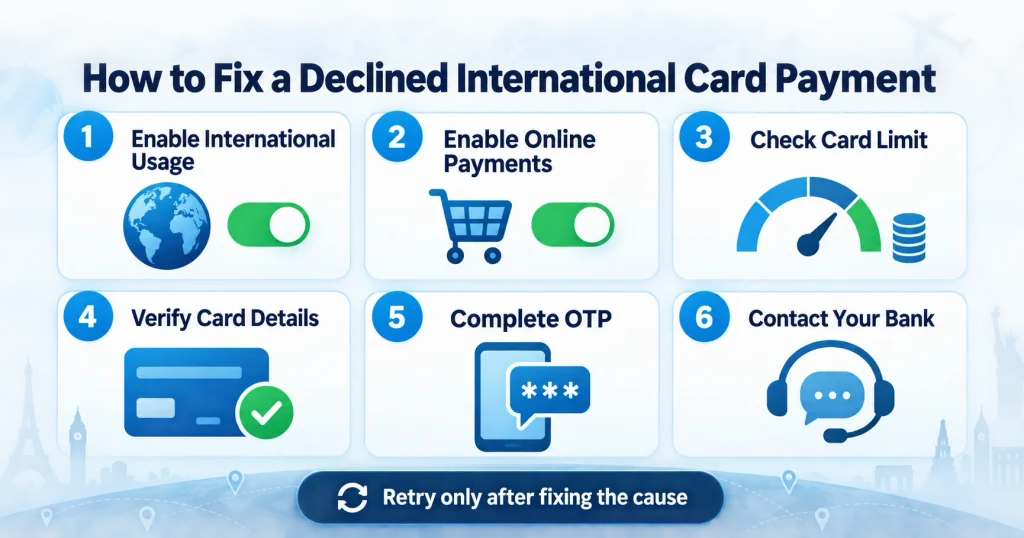
The Correct Order to Fix a Declined International Payment
Follow these steps in order:
Step 1: Read the Error Message
Look for a decline code or explanation. Take a screenshot without exposing card details.
Step 2: Check Card Controls
Confirm international and online usage. Review the limit for the correct channel.
Step 3: Check Available Credit
Allow room for currency conversion, taxes and temporary authorisation holds.
Step 4: Verify Payment Details
Enter the card number, expiry date, CVV and billing address carefully.
Step 5: Complete Authentication
Use the latest OTP or approve the transaction through the official banking app.
Step 6: Try Again Once
Do not make many rapid attempts. Repeated failures can trigger an additional security block.
Step 7: Contact the Issuer
Ask for the exact decline reason. The merchant often sees only a general rejection message.
Step 8: Use a Safe Alternative
Try another supported card, network or payment method. Do not use an unknown payment link sent through chat or email.
International Transaction Declined Despite Sufficient Balance
Sufficient balance does not guarantee approval.
A credit card payment can still fail because:
- Available credit is lower than the total limit.
- A transaction channel is disabled.
- The international limit is too low.
- The merchant does not accept the card.
- Authentication failed.
- The issuer’s fraud system blocked it.
- A temporary authorisation hold reduced the limit.
- The purchase currency or country is restricted.
Call the card issuer if the app does not show the reason. Ask whether the decline came from a limit, fraud rule, merchant category or network response.
Why a Card Works Abroad but Fails on a Foreign Website
In-store international payments and international online payments are different channels.
Your card may have point-of-sale usage enabled while international e-commerce remains disabled. The website may also require authentication that was not needed at a physical terminal.
Review each channel separately in your card settings.
Why a Card Works for Purchases but Fails for Subscriptions
A normal purchase is a one-time transaction. A subscription is recurring.
The merchant must store a payment credential and collect future amounts. This can require a compatible mandate process.
If a foreign subscription keeps failing:
- Check whether the merchant supports Indian-issued cards.
- Look for a mandate approval in the bank app.
- Review the recurring-payment limit.
- Confirm whether the subscription price changed.
- Contact both the merchant and issuer.
Charges to Check Before Retrying
Successful international transactions can cost more than the displayed foreign price.
Possible costs include:
- Foreign currency markup
- GST on applicable charges
- Exchange-rate conversion difference
- Dynamic currency conversion cost
- Cash-advance charges for certain transaction types
Read your card’s latest schedule of charges. A “zero forex markup” benefit may also have conditions, exclusions or a specific process.
Financial costs should always be reviewed before accepting a product. The same principle applies when reading a loan sanction letter or comparing a loan offer.
Is It Safe to Enable International Transactions?
International card usage can be safe when managed carefully.
Follow these precautions:
- Enable international usage only when needed.
- Keep a controlled transaction limit.
- Turn on instant SMS and app alerts.
- Never share an OTP, PIN or CVV.
- Avoid making payments on public Wi-Fi.
- Use the merchant’s official website or app.
- Check the URL before entering card details.
- Disable international usage after the purchase if you rarely use it.
- Review unbilled transactions after every overseas purchase.
If you notice an unauthorised transaction, report it to the issuer immediately. Block or temporarily freeze the card through the official app when necessary.
When Should You Contact the Bank?
Contact the issuer when:
- International and online usage are already enabled.
- Your available limit is sufficient.
- The details are correct.
- OTP authentication was completed.
- Several merchants reject the card.
- A genuine transaction was blocked as suspicious.
- The app does not allow you to change the international limit.
- You see an unfamiliar authorisation or charge.
Share only the information required to trace the transaction:
- Merchant name
- Amount and currency
- Date and time
- Type of purchase
- Decline message or code
Do not share the complete card number, CVV, PIN or OTP through email or ordinary chat.
Can a Declined International Transaction Affect Your Credit Score?
A declined purchase does not normally affect your credit score. It is not a missed loan or credit-card payment.
However, the spending behind the attempt may indicate that your card is close to its limit. High credit utilisation and missed bill payments can affect your credit profile.
Pay bills on time and keep balances manageable. A strong credit record may also help when you negotiate a personal loan interest rate.
Mistakes to Avoid
- Retrying the payment many times within minutes
- Increasing the limit far beyond the purchase amount
- Leaving international usage active permanently without need
- Sharing an OTP with someone claiming to be bank staff
- Using an unknown link to complete the payment
- Ignoring forex markup and conversion costs
- Entering an incorrect billing address repeatedly
- Assuming every website accepts every card network
- Using a public device to save card information
- Believing a successful OTP always guarantees payment approval
Frequently Asked Questions
Why is my credit card international transaction declined?
Common reasons include disabled international usage, a low transaction limit, insufficient available credit, fraud controls, incorrect card details, failed authentication or merchant restrictions.
How do I enable international transactions on my credit card?
Open your issuer’s official app or internet banking service. Select the card, open card controls and enable the required international channel. Confirm the change through OTP or app authentication.
Why is my card declined internationally despite sufficient credit?
The bank may have blocked the merchant or transaction for security reasons. International or online usage may also be disabled. Check the channel limit, authentication and merchant support.
Why does my card work in India but not on a foreign website?
Domestic and international usage have separate controls. Online international transactions may be disabled even when domestic payments work normally.
Why is my international subscription payment failing?
The merchant’s recurring-payment setup may not be compatible with your issuer’s mandate process. The renewal amount may also exceed the permitted limit or require fresh authentication.
Will the bank charge me for a declined international transaction?
A declined purchase usually does not create the normal purchase charge. However, check your statement for temporary authorisation holds or issuer-specific fees. Ask the bank if anything appears unfamiliar.
Can I use a RuPay card for international payments?
It depends on the specific card, network arrangement, issuer controls and merchant acceptance. Check the international logo on the card and confirm eligibility with the issuer.
Should I choose INR or foreign currency at checkout?
Paying in the merchant’s local currency may avoid dynamic currency conversion, but your issuer’s forex charges can still apply. Compare the total rate and card terms before selecting.
Does a declined transaction reduce my CIBIL score?
No. A declined purchase is not normally reported as a missed payment. Your score can be affected if you fail to pay the credit card bill or maintain very high utilisation.
Is it safe to retry the payment?
Correct the likely cause first and retry once. Several rapid attempts may trigger stronger fraud controls or create multiple temporary authorisation holds.
Final Thoughts
A credit card international transaction declined message is frustrating, but the problem is often easy to solve.
Start with card controls. Enable international and online usage. Check the transaction limit and available credit. Then verify your card details and complete authentication carefully.
If the payment still fails, contact the issuer before making repeated attempts. The bank can confirm whether a fraud rule, merchant restriction, mandate problem or technical issue caused the decline.
Keep international usage controlled. Use trusted websites. Review the final cost before paying. These habits can make overseas card payments safer and more reliable.

Hi, I’m Aditya Verma, a tech writer and digital content creator with a passion for exploring technology, apps, online tools, finance, education, and trending topics. I create well-researched and practical content that helps everyday readers understand useful information in a simple and easy-to-follow way.