FASTag Annual Pass Renewal Problems: Causes and Easy Fixes
Renewing your FASTag Annual Pass should be simple. However, some users find that the renewal option is missing. Others complete the payment but their pass remains inactive.
You may also notice regular toll deductions after renewal.
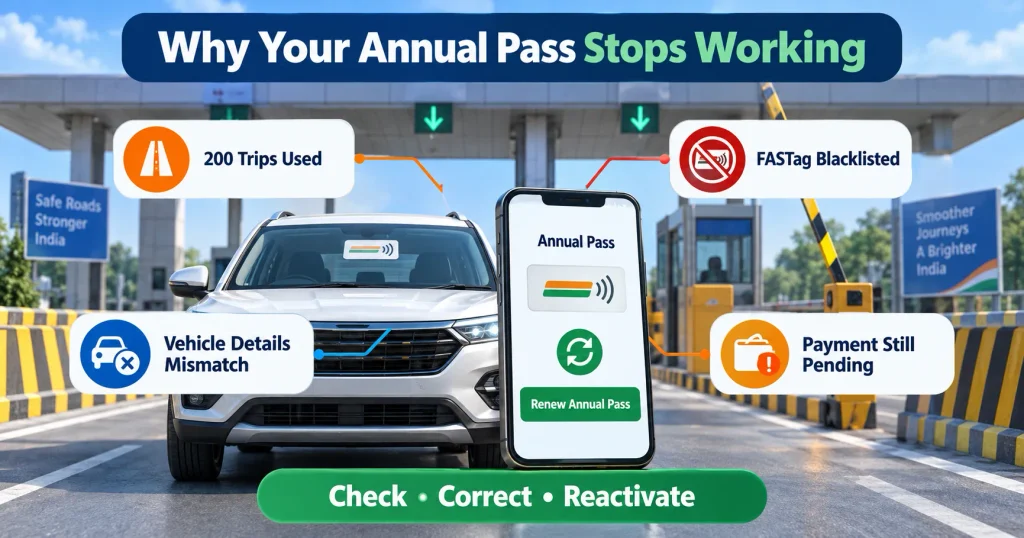
These issues can happen because of an expired pass, incorrect vehicle information or a blacklisted FASTag. A chassis number instead of a permanent registration number can also block activation.
Fortunately, most FASTag Annual Pass renewal problems can be fixed without purchasing a new FASTag.
This guide explains the main causes and their solutions.
Table of Contents
How the FASTag Annual Pass Works
The FASTag Annual Pass is an optional facility for eligible private vehicles.
It is available for private, non-commercial:
- Cars
- Jeeps
- Vans
The pass is connected to your existing FASTag. A separate FASTag is not required if your current tag meets the eligibility conditions.
It provides passage at designated National Highway and National Expressway fee plazas for:
- One year from activation, or
- 200 eligible trips
The condition reached first will end the pass.
Once the pass ends, your FASTag returns to normal mode. Standard toll charges are then deducted from the FASTag wallet.
Current FASTag Annual Pass Fee in 2026
The FASTag Annual Pass originally cost ₹3,000 for FY 2025–26.
The fee was revised to ₹3,075 for FY 2026–27, effective from April 1, 2026.
Always check the latest amount inside the official Rajmargyatra app before making payment. The fee can be revised for a new financial year.
Do not purchase the Annual Pass through an unknown website or payment link.
Your Earlier Pass May Have Reached Its Limit
The most common renewal issue is not actually a technical error.
Your pass may have already completed:
- 200 trips, or
- One year from activation
The pass ends when either limit is reached. It does not continue until both conditions are completed.
For example, if you use all 200 trips within six months, the pass will end at that point. You cannot continue using it for the remaining six months.
Similarly, the pass will expire after one year even if some trips remain unused.
What to do
Open the Rajmargyatra app and check:
- Activation date
- Expiry date
- Trips already used
- Current pass status
If the pass has ended, use the available option to reactivate it.
The Renewal Option Is Missing
Sometimes, the Annual Pass section does not display a renewal or reactivation button.
Possible reasons include:
- Your existing pass is still active.
- You are using an outdated app.
- The vehicle is linked to another mobile number.
- FASTag details are still under verification.
- The correct vehicle is not showing in your account.
- The service is temporarily unavailable.
What to do
Update the Rajmargyatra app to its latest version. Log out and sign in again using the mobile number connected to your FASTag.
Check whether the correct vehicle appears in the account.
If the vehicle is missing, contact the FASTag issuer and confirm which mobile number is linked to the tag.
You can also wait and try again later if the official service is temporarily unavailable.
Payment Was Deducted but the Pass Is Inactive
A common complaint is that the bank confirms the payment, but the app does not activate the pass.
Activation may be delayed because:
- Payment confirmation is still pending.
- Vehicle verification is incomplete.
- The app is experiencing heavy traffic.
- FASTag records do not match.
- The transaction did not reach the final confirmation stage.
Activation normally takes place within two hours after successful verification and payment.
What to do
Do not make a second payment immediately.
Save the following information:
- Payment receipt
- Bank or UPI transaction ID
- FASTag ID
- Vehicle registration number
- Screenshot of the pending status
- Date and time of payment
Wait for the normal processing period. Reopen the app and check the status again.
If the pass remains inactive, raise a complaint through the official support channel. Provide all transaction details.
FASTag Is Still Linked to a Chassis Number
A FASTag registered only with a chassis number is not eligible for the Annual Pass.
This usually happens when the tag is purchased before a new vehicle receives its permanent registration number.
What to do
Contact your FASTag issuer and request a VRN update.
You may need to provide:
- Registration Certificate
- Permanent vehicle number
- FASTag ID
- Registered mobile number
- Owner’s identity document
After the Vehicle Registration Number, or VRN, is updated, wait for the record to refresh. Then try the activation process again.
Vehicle Information Does Not Match
The Annual Pass system verifies your FASTag and vehicle details.
Even a minor difference can cause renewal failure. Common mismatches include:
- Incorrect registration number
- Wrong vehicle class
- Outdated owner details
- Commercial classification
- FASTag linked to a different vehicle
- Spelling or number errors
What to do
Compare the information in your FASTag account with your Registration Certificate.
The registration number and vehicle class should match exactly.
If you find a mistake, contact the FASTag issuer. Get the information corrected before making another payment.
The Annual Pass is linked to one vehicle. It cannot be transferred to another car, even when both cars have the same owner.
Your FASTag Has Been Blacklisted
A blacklisted FASTag cannot support an Annual Pass.
Blacklisting may happen because of:
- Incomplete KYC
- Low or negative balance
- Duplicate FASTags
- Incorrect vehicle details
- Wrong vehicle class
- Closed or inactive account
- A pending compliance issue
A positive wallet balance does not always mean that the tag is active.
What to do
Contact the bank or company that issued your FASTag.
Ask for the exact reason behind the blacklist. The toll plaza operator cannot reactivate your tag.
Complete the required correction. This could involve updating KYC, recharging the account or closing a duplicate tag.
Always ask for a complaint reference number. Once the FASTag is active again, return to the Rajmargyatra app and restart the Annual Pass process.
Managing tolls, insurance and fuel costs can become difficult without a monthly plan.
More Than One FASTag Is Active
A vehicle should have only one active FASTag.
You may face verification problems if an older tag remains active after switching to a new bank.
Simply removing the old sticker does not close its account.
What to do
Contact the previous issuer. Ask it to close the unused FASTag formally.
Wait for the closure to appear in the system. After that, use the current FASTag for Annual Pass activation.
The Windshield Tag Is Loose or Damaged
Your FASTag must be properly attached to the registered vehicle’s windshield.
The scanner may not read a tag that is:
- Damaged
- Loose
- Incorrectly positioned
- Covered by another sticker
- Removed and attached again
- Installed on another vehicle
What to do
Inspect the tag without removing it.
If it is damaged or peeling, contact the issuer for a replacement. Wait until the replacement becomes active before trying to purchase the Annual Pass.
Never move the same FASTag from one vehicle to another.
Toll Charges Continue After Renewal
A normal toll deduction does not always mean the Annual Pass renewal failed.
The pass is valid only at designated National Highway and National Expressway fee plazas.
Normal FASTag charges may apply at:
- State Highway toll plazas
- State-managed expressways
- Municipal toll points
- Parking facilities
- Local authority roads
- Other non-covered locations
At these places, the FASTag works as a regular tag.
What to do
Open your transaction history and identify the toll plaza.
If it is outside the Annual Pass network, the deduction is expected.
If the plaza should be covered, save the transaction message and a screenshot of your active pass. Contact the FASTag issuer and raise a dispute.
Vehicle owners should also understand the financial protection provided by their motor policy.
Scanner Does Not Read an Active Pass
Your pass may appear active in the app while the toll barrier remains closed.
The problem might be caused by:
- A faulty toll scanner
- A damaged FASTag
- Incorrect tag placement
- Delayed system updates
- A temporary NETC issue
- Windshield tint or another obstruction
What to do
Ask the toll staff to check the tag again or direct you to another working lane.
Show the active Annual Pass status if necessary. Do not peel the FASTag off the windshield.
If you are charged, collect a receipt. Record the plaza name, lane number, date and time.
You can report toll-plaza problems through the National Highway helpline at 1033.
Correct Way to Renew the FASTag Annual Pass
Follow these steps:
- Open the official Rajmargyatra mobile app.
- Sign in with the mobile number linked to your FASTag.
- Open the Annual Pass section.
- Select the correct registered vehicle.
- Review the FASTag and vehicle details.
- Confirm that the vehicle is eligible.
- Check that the FASTag is active and not blacklisted.
- Select the available reactivation option.
- Pay the fee shown on the official platform.
- Save the payment confirmation.
- Wait for the activation message.
- Check the new validity before travelling.
For FY 2026–27, the Annual Pass fee is ₹3,075.
Can the FASTag Wallet Balance Pay for Renewal?
No. The Annual Pass fee must be paid separately through the payment methods available on the official platform.
Money already available in your FASTag wallet cannot be used to purchase the Annual Pass.
However, you should still maintain a sufficient wallet balance. It may be required for:
- Non-covered toll plazas
- State Highway tolls
- Parking payments
- Regular FASTag transactions
How the 200 Trips Are Counted
The method depends on the tolling system.
Point-based fee plaza
Each crossing is counted as one trip.
If you cross the same plaza while going and returning, two trips are used.
Closed tolling system
One complete entry and exit pair is generally counted as one trip.
Check the trip history inside the app regularly. This will help you estimate when your allowance may end.
Also, check our Health Insurance Waiting Period: 10 Smart Ways to Avoid Claim Rejection in 2026
Renewal Checklist for Drivers
Before paying for the Annual Pass again, confirm that:
- Your previous pass has ended.
- The trip count or expiry date is visible.
- Your vehicle is private and non-commercial.
- The FASTag is linked to a permanent VRN.
- The vehicle details match the RC.
- KYC is complete.
- The FASTag is active.
- The tag is not blacklisted.
- No duplicate tag is active.
- The sticker is properly attached.
- You are using the official platform.
- Your registered mobile number is active.
- You have saved the payment receipt.
These checks can prevent most FASTag Annual Pass renewal problems.
Where to Report the Issue
| Issue | Contact |
|---|---|
| Incomplete KYC | FASTag issuer |
| Blacklisted tag | FASTag issuer |
| Incorrect VRN | FASTag issuer |
| Wrong vehicle class | FASTag issuer |
| Duplicate FASTag | Issuing banks |
| Damaged sticker | FASTag issuer |
| Payment completed but pass inactive | Rajmargyatra support or issuer |
| Incorrect toll deduction | FASTag issuer |
| Faulty toll scanner | NHAI helpline 1033 |
| Toll-plaza complaint | NHAI helpline 1033 |
Ask for a complaint number whenever you report an issue. Keep it until the matter is resolved.
Frequently Asked Questions
Final Thoughts
Most FASTag Annual Pass renewal problems are caused by completed validity, incorrect vehicle details or an inactive FASTag.
Begin by checking the expiry date and trip count. Then verify the VRN, vehicle class, KYC and FASTag status.
Use only the official Rajmargyatra platform. Pay the amount displayed there and save your receipt.
Once the underlying problem is fixed, the Annual Pass can usually be reactivated without replacing your existing FASTag.

Hi, I’m Aditya Verma, a tech writer and digital content creator with a passion for exploring technology, apps, online tools, finance, education, and trending topics. I create well-researched and practical content that helps everyday readers understand useful information in a simple and easy-to-follow way.